
Extending Simple JWT Authentication with Refresh Tokens with Spring Boot (Hazelcast cache cluster version)
In the previous examples, we covered JWT authentication with refresh tokens stored in a database and in local cache. Now, we present a solution using a Hazelcast cluster, which allows refresh tokens to be shared across multiple application instances. This approach ensures consistency and scalability in multi-node environments.
Benefits of using a Hazelcast cluster:
- Shared state: Refresh tokens are stored in a distributed cluster, making them accessible from any instance.
- Scalability: Adding new application instances requires no additional cache configuration, as Hazelcast automatically synchronizes data across nodes.
- Performance: With in-memory storage, token access is fast and database load is reduced.
Considerations / Trade-offs:
- Configuration complexity: Integrating Hazelcast requires additional setup and is more complex than using local cache.
- Cluster management: Monitoring and maintaining the cluster is required to ensure availability and performance.
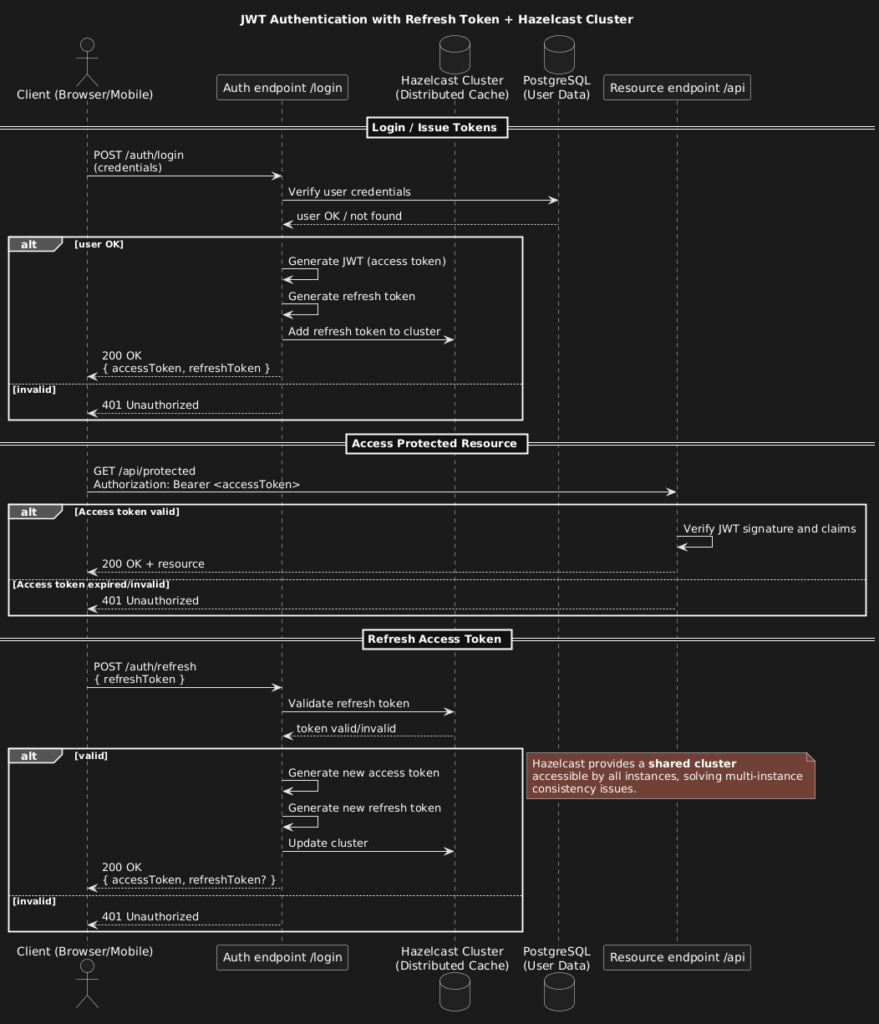
What You Get
- Basic Auth + JWT: Users log in with credentials and receive a JWT token.
- Refresh Tokens in Hazelcast: Tokens are stored in a distributed Hazelcast cluster, accessible to all application instances.
- Swagger UI: Explore and test endpoints at
http://localhost:8088/swagger-ui/index.html.
Setup in 4 Steps
- Clone the repository
git clone https://github.com/marcinzygmunt-pl/spring-boot-jwt-with-refresh-cache-hazelcast.git
cd spring-boot-jwt-with-refresh-cache-hazelcast
- Configure PostgreSQL and Hazelcast
Editapplication.ymlwith your database credentials and Hazelcast cluster settings. - Run the application
./mvnw spring-boot:run
- Test endpoints in Swagger UI
Openhttp://localhost:8088/swagger-ui/index.htmland test login, token refresh, and protected endpoints.
How to see it in ACTION ?
Run 2 different instances of SpringBoot with different hazelcast configurations (see application.yml comments) Login and generate new JWT with refresh send to second instance of application.
Monitor Hazelcast with Hazelcast Managment Center in Docker container
docker run --rm -p 8080:8080 hazelcast/management-center:$MC_VERSIONFinal Note
spring-boot-jwt-with-refresh-cache-hazelcast is the most advanced version in the series: it builds on refresh tokens with caching and adds a shared Hazelcast cluster to support multi-instance deployments safely and efficiently.