
Extending Simple JWT Authentication with Refresh Tokens with Spring Boot (Cache version)
After building spring-boot-jwt-with-refresh, I wanted to demonstrate how to improve performance by caching refresh tokens. That’s why I created spring-boot-jwt-with-refresh-cache. This project shows how to securely manage JWT authentication with refresh tokens stored in a cache, reducing database lookups and supporting scalable applications.
TIP: Using a cache like Spring Cache improves performance. However, in multi-instance deployments, local caches are isolated per instance, which can lead to inconsistencies if a refresh token is used on a different server. This limitation is addressed in the Hazelcast version, where a shared cluster ensures all instances have access to the same refresh tokens.
Like the previous examples, this project is built with Spring Boot 3.
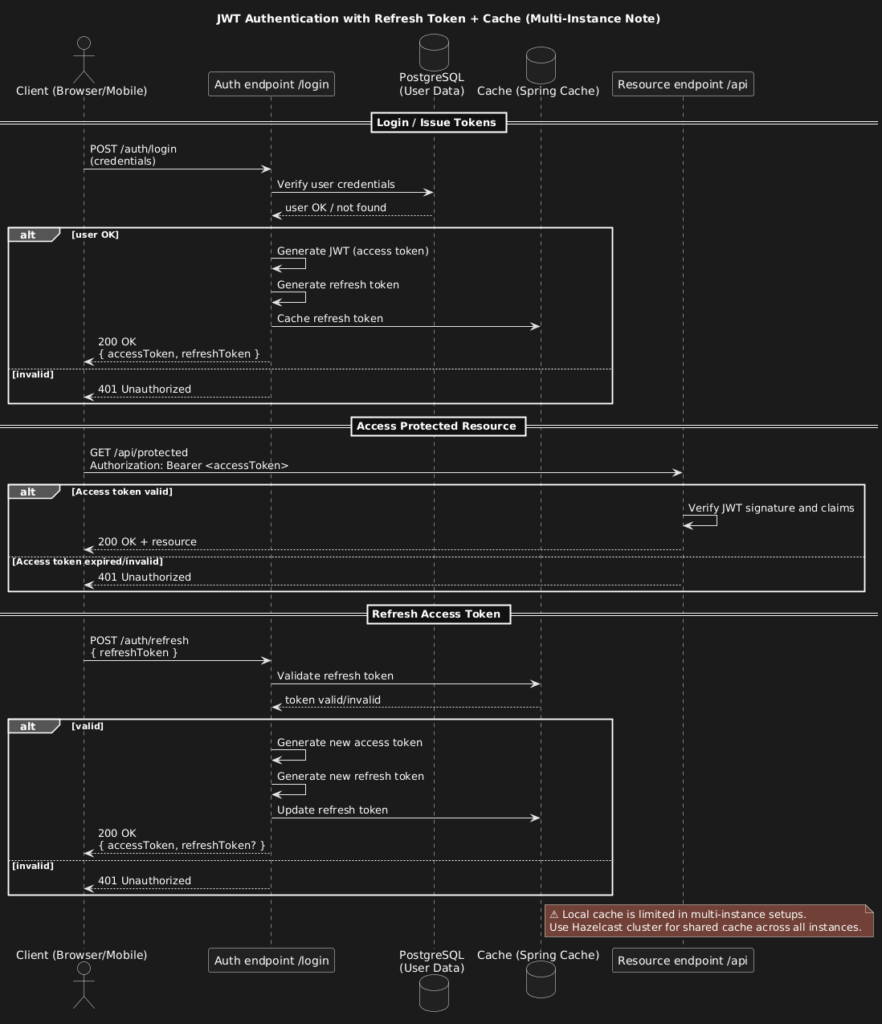
What You Get
- Basic Auth + JWT: Users log in with credentials and receive a JWT token.
- Refresh Tokens in Cache: Refresh tokens are stored in a cache, improving performance.
- Swagger UI: Explore and test endpoints at
http://localhost:8088/swagger-ui/index.html.
Setup in 4 Steps
- Clone the repository
git clone https://github.com/marcinzygmunt-pl/spring-boot-jwt-with-refresh-cache.git
cd spring-boot-jwt-with-refresh-cache- Configure PostgreSQL and Cache
Editapplication.ymlwith your database credentials and cache settings. - Run the application
./mvnw spring-boot:run- Test endpoints in Swagger UI
Openhttp://localhost:8088/swagger-ui/index.htmland test login, token refresh, and protected endpoints.
Optional: Go Further
- For multi-instance deployments, consider Hazelcast to share refresh tokens across all nodes reliably.
These options are explored in other branches for more advanced setups.
Final Note
spring-boot-jwt-with-refresh-cache is the next step in the series: it builds on the refresh token mechanism and adds caching for efficiency. Be aware that local caches have limitations in multi-instance setups. The Hazelcast version resolves this issue by providing a shared cluster accessible by all instances, ensuring consistent token validation and refresh across the application.