
Extending Simple JWT Authentication with Refresh Tokens with Spring Boot (DB version)
If you’re already familiar with the [basic JWT setup], this project shows how to safely refresh expired tokens while keeping your API secure and managing long-lived user sessions.
When token expires you don’t need to login again and send full credentials – just use refresh token instead to get another set of access and refresh tokens.
TIP: Storing refresh tokens in the database also allows them to be shared across multiple instances of the application.
Like the previous example, this project is built with Spring Boot 3.
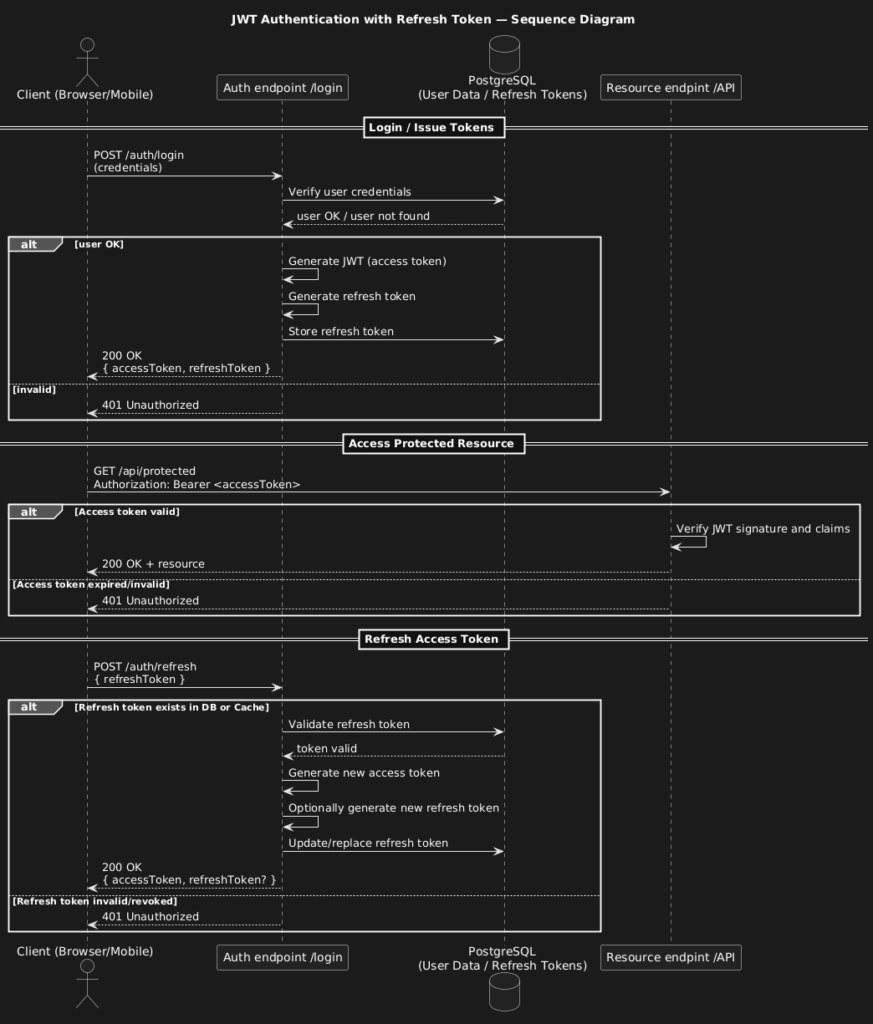
What’s included in the project
- Basic Auth + JWT: Users log in with credentials and receive a JWT token.
- User data and Refresh Tokens stored in the database: Credentials and refresh tokens are stored in PostgreSQL, allowing secure session renewal.
- Swagger UI: Explore and test endpoints at
http://localhost:8088/swagger-ui/index.html.
Setup in 4 Steps
- Clone the repository
git clone https://github.com/marcinzygmunt-pl/spring-boot-jwt-with-refresh.git
cd spring-boot-jwt-with-refresh- Configure PostgreSQL
Update your database credentials in theapplication.ymlfile. - Run the application
./mvnw spring-boot:run- Test endpoints in Swagger UI
Openhttp://localhost:8088/swagger-ui/index.htmland check login, token refresh, and access to protected resources.
See also:
- Refresh in CACHE
- Refresh in HAZELCAST (multi-instance setup)